Integrate a Generic API Risk Engine
An external risk engine provider is a source of risk alerts or risk events. The IDaaS Generic API risk engine supports integration with external risk engines. IDaaS evaluates risk contexts from an external risk engine to build risk engine rules. With an external risk engine API integration, your organization implements a service that can be reached by REST. The integration works as shown in the following figure:
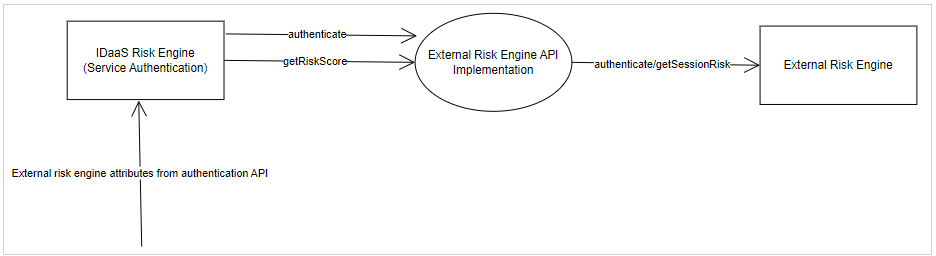
To integrate a Generic API with an External Risk Engine, complete the following steps:
Step 1: Build and deploy a REST service that implements the two "Generic API" External Risk Engine endpointsStep 1: Build and deploy a REST service that implements the two "Generic API" External Risk Engine endpoints
Your REST service must implement the two endpoints as shown in the following table:
|
Endpoint |
Request Method |
URL |
JSON Request Attributes |
JSON Response Attributes |
Notes |
|
Authentication |
POST |
<URL>/v1/authenticate |
companyId (String) riskProvider (String) identifier (String) password (String) |
token (String) |
The request attributes are defined when the Generic API external risk engine is created. The password attribute is optional. The response token attribute value is sent in the Authorization header to the Get Risk Score endpoint. Note that this endpoint is only called at the beginning and then only after the token expires. Token Expiration is configured in the Risk Engine. |
|
Get Risk Score |
POST |
<URL>/v1/riskscore |
companyId (String) riskProvider (String) All RBA transactionDetails attributes IDaaS_AccountId (String) IDaaS_UserId IDaaS_UserUuid IDaaS_ClientIpAddress IDaaS_UserAliases (Optional) |
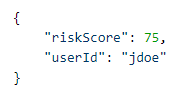
riskScore (number) companyId (String) - Optional userId (String) - Optional |
riskScore is mapped to an IDaas Rule using the risk Risk Item companyId is not used currently userId: This is the external risk provider userId. If the risk engine is configured to match this value with the IDaaS userId value and the values do not match, the risk evaluation is considered as failing and contributes all risk points defined. IDaaS_UserAliases is only included in the request if the risk engine is configure to check User ID mismatch. |
IDaaS will invoke the authentication endpoint with the provided credentials when the risk engine is defined in IDaaS to verify that the service is reachable and that the credentials are valid. If you get an Invalid username or password error, then either the service cannot be contacted or the credentials are invalid.
At runtime, when the IDaaS Authentication API is invoked, IDaaS first calls the REST service Authentication endpoint and cache the returned token for as many minutes as set in the Token Expiration attribute when the risk engine is defined in IDaaS. It then sends the token, as an Authorization header, when calling the REST Get Risk Score endpoint.
Notes:
- The rest service host must be accessible from the Internet (hostname resolvable by DNS lookups).
- The rest service must run on HTTPS with a certificate issued by a trusted CA. IDaaS trusts all CAs defined in the Java JDK truststore.
Step 2: Create a Generic API External Risk EngineStep 2: Create a Generic API External Risk Engine
Configure an external risk engine
Before you begin, ensure that you know the credentials for your external risk provider.
Click  > Configuration > External Risk Engines. The External Risk Engines page appears.
Click Add and then select the Generic API External Risk Engine Provider from the drop-down list. The Add External Risk Engine page appears.
The Name field is predefined.
Select Enabled to enable the external risk engine.
Note: You can also enable or disable the external risk engine after you add it from the External Risk Engines page.
Enter the external risk engine credentials, for example the Username/Identifier and Password. This value can be an API-key or username.
Under Attributes, do the following:
Enter the URL.
Enter the External Risk Provider.
Enter the Company ID provided to you by the external risk engine.
Enter the Token Expiration for the token used by the external search engine.
Select Fail evaluation when identities do not match if the user session and the user do not match.
Optional. Add Rules as follows:
Click Add. The Add Rule dialog box appears.
Enter a Name for the rule that defines the risk factor.
Select the Risk Item from the drop-down list. There are two options:
Risk: The risk score returned by the external risk provider.
serviceStatus: This item is available for all external risk engines integrated with IDaaS. It can be used to decide what the system should do when the external risk engine is not available.
To use this item, create a rule with serviceStatus EQUALS FAILURE. This rule can then be used in a resource rule in combination with other rules. If the evaluation of the external risk engine is critical to grant access to an application, you can give enough risk points to this rule so that risk score is reached and the evaluation moves into the High Risk scenario.
See your external risk engine documentation for a description of other risk items.
Select the required Operator from the drop-down list.
Add a value in the Value text box.
Optional. To add more rules to the rule, do the following:
- Click Add Group.
- Select the AND or OR operator for each added group expression.
- Select the Risk Item from the drop-down list.
- Select the required Operator from the drop-down list.
- Add a value in the Value text box.
Click Add.
Repeat these steps to add more external risk engine rules.
Click Save to save the external risk engine and return to the External Risk Engines page.
Step 3: Create an Authentication APIStep 3: Create an Authentication API
Integrate Authentication API with IDaaS
Click > Security > Applications. The Applications page appears.
Click Add. The Select an Application Template page appears.
Do one of the following:
Select Identity as a Service Integrations from the search drop-down list and scroll to find the application you want to add to IDaaS.
- or -
In the Search bar, enter a search option to filter for the application you want to add to IDaaS.
Click Authentication API. The Add Authentication API page appears.
In the Application Name field, type a name for your application.
In the Application Description field, type a description for your application.
Optional. Add a custom application logo as follows:
Click  next to Application Logo. The Upload Logo dialog box appears.
Click  to select an image file to upload.
Browse to select your file and click Open. The Upload Logo dialog box displays your selected image.
If required, resize your image.
Click OK.
Select Enable passkey login to allow users to complete passkey authentication in the Auth API.
Click Next. The General Settings page appears.
Select the Source of the Client IP Address for Risk Conditions. The options are:
Not provided—The IP address is not provided and is not extracted from the connection.
Provided in the API—The IP address is provided in the request body of the API.
From the incoming HTTP connection—The IP address is extracted from the connection.
Select Do not use IP Address for Resource Rule Risk Factors if you only want to use the IP address for Audits but not for the resource rule risk conditions.
Select Enabled for User Verification Check to allow user verification through the Auth API for Identity Provider authentication.
Select Application can store values for the user to allow the Auth API to call self-admin (internal) APIs that are used to Manage Client Values.
Click Submit. The Application ID is generated.
Copy and paste the Application ID into the IDaaS API calls being used by your application.
Click Done.
Step 4: Add a resource ruleStep 4: Add a resource rule
Step 5: Use the Authentication API (Query User Authenticators) to send the requestStep 5: Use the Authentication API (Query User Authenticators) to send the request
In this integration you use the Authentication API to send attributes required by the external risk provider as part of the Transaction Details using the risk-based authentication (RBA) usage type:

Sample REST requests
Authentication endpoint
Requests:
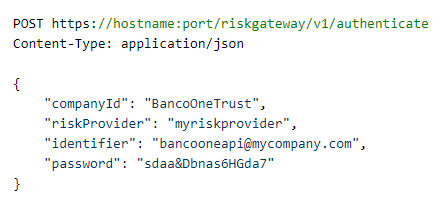
Response:

Get Risk Score endpoint
Request:
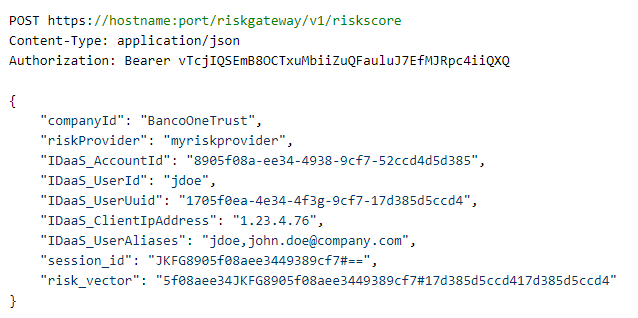
Response: