Sample resource rule graphs
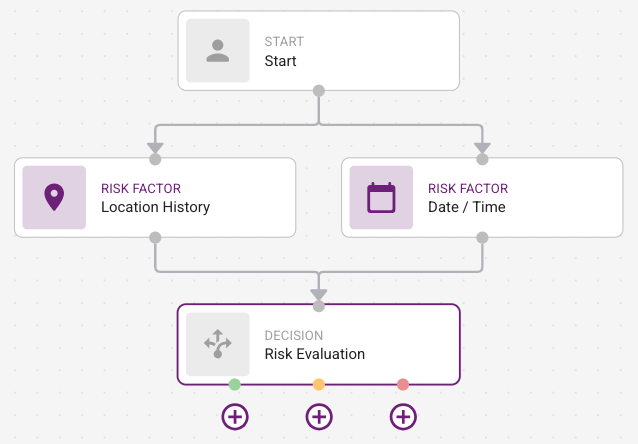
A resource rule follows this flow:
Start—The General Settings to input the name and description of the resource rule.
Tip: Anytime you click in the Canvas of the graph, the General Settings appear.
Access Control—Optional. Set Authentication Context References, Domain-based IdP, and Groups to further streamline whether users accessing the resource can have access to this resource rule.. They must connect to Access Evaluation.
Authentication Context ReferencesAuthentication Context References
Domain-based IdPDomain-based IdP
Access Evaluation—Connect the Access Filters to the Risk Factors.
Risk Factors—Add the Risk Factors that are evaluated in the Risk Assessment. They must be connected to Risk Evaluation.
Risk Evaluation—Determine the user risk levels assessed by the risk factors.
Authentication Tasks—Add the Authentication Results for low, medium, or high risk to determine the authentication flow required to allow or deny access to the protected resource.
Examples
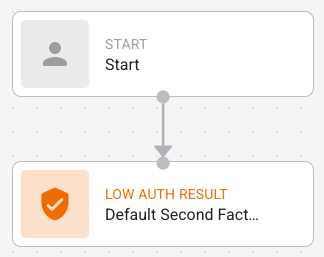
This is the template presented to you when creating a new resource rule. It is a simple resource rule with no additional risk factors.
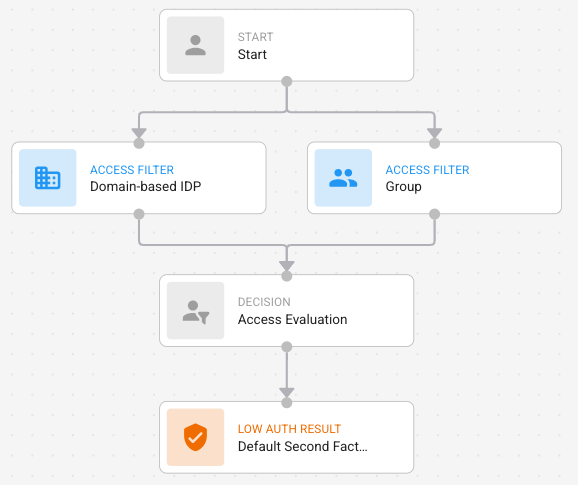
Access Filter nodes (Groups, Domain-based IDP, Access Context Reference) must connect to start and the Access Evaluation node. Access filters are optional.
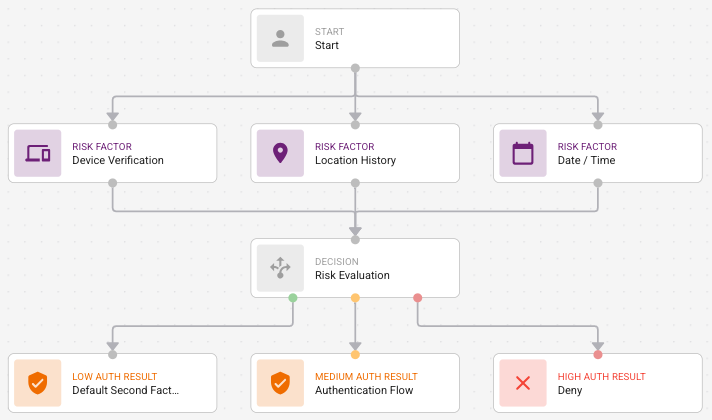
All risk factors must connect to a Risk Evaluation node. If Access Filters are present, the top of the risk factor nodes must connect to the Access Evaluation node (Figure A). Otherwise, they must connect to start (Figure B).
Figure A

Figure B
Risk Evaluation/ Authentication FlowRisk Evaluation/ Authentication Flow
The Risk Evaluation node has three handles and can have three outgoing edges that represent the low, medium, and high authentication flows.